Documentation Index
Fetch the complete documentation index at: https://docs.statsig.com/llms.txt
Use this file to discover all available pages before exploring further.
Introduction
You can export your data from Statsig to your data warehouse with a data connection. This lets you send exposures and events directly to your warehouse for further analysis. We currently support connections to Snowflake, Redshift, S3, BigQuery, and Databricks.
Data Warehouse Exports are an Enterprise-only feature. If you are on the Developer or Pro tiers and wish to upgrade to Enterprise, feel free to reach out to our team here or via support. How to Begin
- Go to Statsig Console
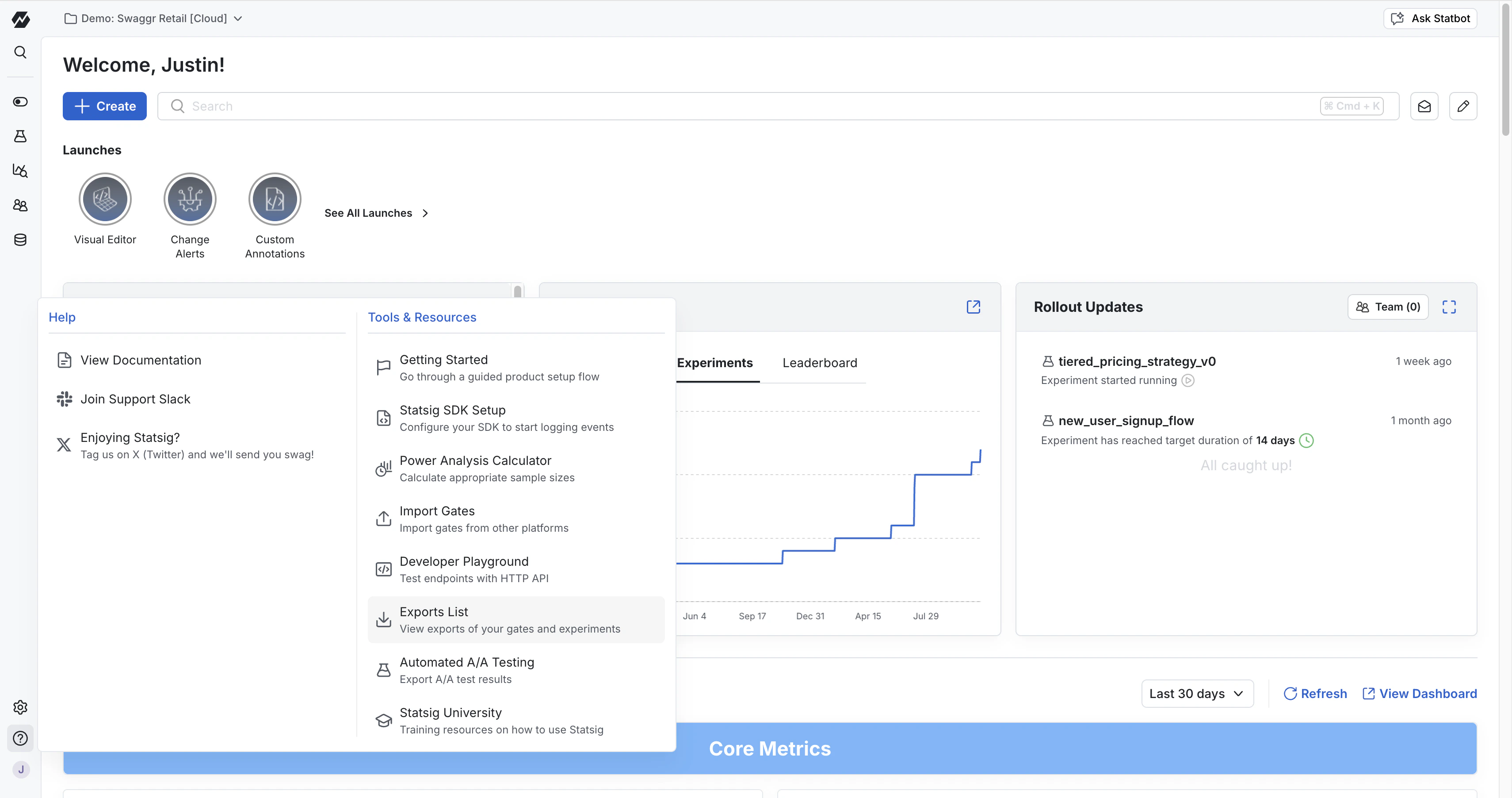
- Navigate to the Help and Tools Section on the side navigation bar
- Go to “Exports List”
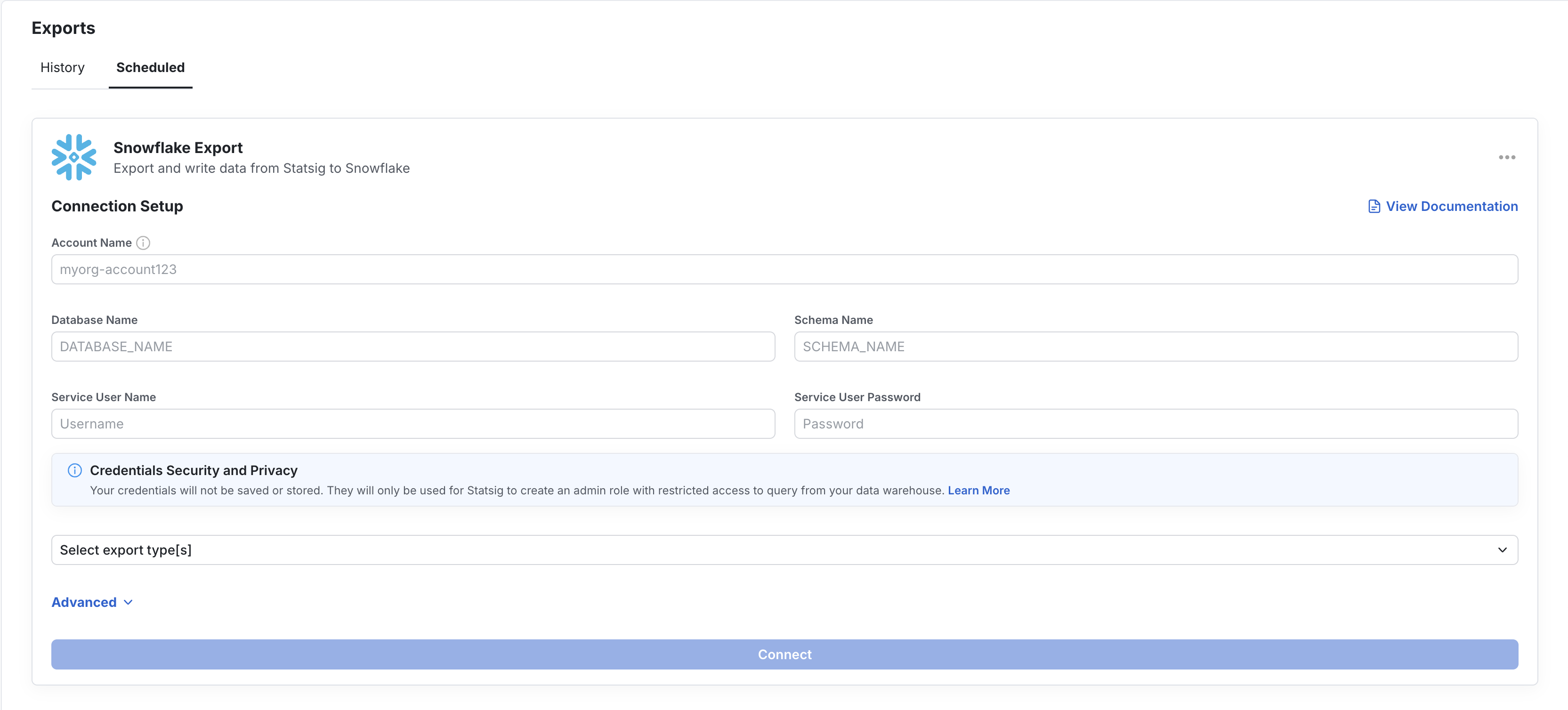
On the Exports page, you will find an Export History tab and a Schedule Export tab. The Export History tab shows you a list of all previous experimentation exports triggered from the Experiment Results page. To understand how to export one-off experimentation results, check out the documentation here.
Under the Scheduled Export tab, you will be prompted to set up a data warehouse connection. You will be required to set up connections with the necessary credentials and grant Statsig Read, Write, and Delete permissions. The warehouse-specific tabs below show the fields Statsig asks for and example SQL you can use to create each export table yourself.
Table Schema
Statsig can export both Exposures and Events to your destination. The exported columns are logically the same across SQL warehouses, but the physical types vary by warehouse. S3 is a file destination rather than a SQL table destination.
BigQuery
Snowflake
Redshift
Databricks
S3
Setup summaryConfigure:
- BigQuery Project ID
- BigQuery Dataset ID
- one destination table name per export type
Permissions:
- grant the Statsig service account
BigQuery User at the project level
- grant the same service account
BigQuery Data Editor on the target dataset
Statsig uses this access to create the table if needed and validate the connection by inserting and deleting a test row.If you prefer to create the export tables yourself, you can use SQL like this:CREATE TABLE IF NOT EXISTS `PROJECT_ID.DATASET_ID.EXPOSURES_TABLE` (
company_id STRING,
unit_id STRING,
unit_type STRING,
exposure_type STRING,
name STRING,
rule STRING,
experiment_group STRING,
first_exposure_utc TIMESTAMP,
first_exposure_pst_date DATE,
as_of_pst_date DATE,
percent FLOAT64,
rollout BIGINT,
user_dimensions STRING,
inserted_at TIMESTAMP,
rule_name STRING,
group_id STRING,
non_analytics BOOLEAN
);
CREATE TABLE IF NOT EXISTS `PROJECT_ID.DATASET_ID.EVENTS_TABLE` (
  user_id STRING,
  stable_id STRING,
  custom_ids JSON,
  timestamp TIMESTAMP,
  event_name STRING,
  event_value STRING,
  user_object JSON,
  statsig_metadata JSON,
  company_metadata JSON
);
| Field name | Type | Mode |
|---|
| company_id | STRING | NULLABLE |
| unit_id | STRING | NULLABLE |
| unit_type | STRING | NULLABLE |
| exposure_type | STRING | NULLABLE |
| name | STRING | NULLABLE |
| rule | STRING | NULLABLE |
| experiment_group | STRING | NULLABLE |
| first_exposure_utc | TIMESTAMP | NULLABLE |
| first_exposure_pst_date | DATE | NULLABLE |
| as_of_pst_date | DATE | NULLABLE |
| percent | FLOAT64 | NULLABLE |
| rollout | BIGINT | NULLABLE |
| user_dimensions | STRING | NULLABLE |
| inserted_at | TIMESTAMP | NULLABLE |
| rule_name | STRING | NULLABLE |
| group_id | STRING | NULLABLE |
| non_analytics | BOOLEAN | NULLABLE |
| Field name | Type | Mode |
|---|
| user_id | STRING | NULLABLE |
| stable_id | STRING | NULLABLE |
| custom_ids | JSON | NULLABLE |
| timestamp | TIMESTAMP | NULLABLE |
| event_name | STRING | NULLABLE |
| event_value | STRING | NULLABLE |
| user_object | JSON | NULLABLE |
| statsig_metadata | JSON | NULLABLE |
| company_metadata | JSON | NULLABLE |
Setup summaryConfigure:
- Account Name
- Database Name
- Schema Name
- either Username and Password, or Private Key authentication
- one destination table name per export type
Permissions:
- the configured user must be able to create tables and insert/delete rows in the target database and schema
If you prefer to create the export tables yourself, you can use SQL like this:CREATE TABLE IF NOT EXISTS DATABASE_NAME.SCHEMA_NAME.EXPOSURES_TABLE (
company_id STRING,
unit_id STRING,
unit_type STRING,
exposure_type STRING,
name STRING,
rule STRING,
experiment_group STRING,
first_exposure_utc TIMESTAMP,
first_exposure_pst_date DATE,
as_of_pst_date DATE,
percent DOUBLE,
rollout BIGINT,
user_dimensions STRING,
inserted_at TIMESTAMP,
rule_name STRING,
group_id STRING,
non_analytics BOOLEAN
);
CREATE TABLE IF NOT EXISTS DATABASE_NAME.SCHEMA_NAME.EVENTS_TABLE (
  user_id STRING,
  stable_id STRING,
  custom_ids STRING,
  timestamp TIMESTAMP,
  event_name STRING,
  event_value STRING,
  user_object STRING,
  statsig_metadata STRING,
  company_metadata STRING
);
| Field name | Type | Mode |
|---|
| company_id | STRING | NULLABLE |
| unit_id | STRING | NULLABLE |
| unit_type | STRING | NULLABLE |
| exposure_type | STRING | NULLABLE |
| name | STRING | NULLABLE |
| rule | STRING | NULLABLE |
| experiment_group | STRING | NULLABLE |
| first_exposure_utc | TIMESTAMP | NULLABLE |
| first_exposure_pst_date | DATE | NULLABLE |
| as_of_pst_date | DATE | NULLABLE |
| percent | DOUBLE | NULLABLE |
| rollout | BIGINT | NULLABLE |
| user_dimensions | STRING | NULLABLE |
| inserted_at | TIMESTAMP | NULLABLE |
| rule_name | STRING | NULLABLE |
| group_id | STRING | NULLABLE |
| non_analytics | BOOLEAN | NULLABLE |
| Field name | Type | Mode |
|---|
| user_id | STRING | NULLABLE |
| stable_id | STRING | NULLABLE |
| custom_ids | STRING | NULLABLE |
| timestamp | TIMESTAMP | NULLABLE |
| event_name | STRING | NULLABLE |
| event_value | STRING | NULLABLE |
| user_object | STRING | NULLABLE |
| statsig_metadata | STRING | NULLABLE |
| company_metadata | STRING | NULLABLE |
Setup summaryConfigure:
- Cluster Endpoint
- Username and Password
- Staging Schema
- one destination table name per export type
Permissions:
- the configured user must be able to create tables and insert/delete rows in the target database and schema
- if your cluster is not directly reachable, you can also configure SSH tunneling
If you prefer to create the export tables yourself, you can use SQL like this:CREATE TABLE IF NOT EXISTS "DATABASE_NAME"."STAGING_SCHEMA"."EXPOSURES_TABLE" (
"company_id" VARCHAR,
"unit_id" VARCHAR,
"unit_type" VARCHAR,
"exposure_type" VARCHAR,
"name" VARCHAR,
"rule" VARCHAR,
"experiment_group" VARCHAR,
"first_exposure_utc" TIMESTAMP,
"first_exposure_pst_date" DATE,
"as_of_pst_date" DATE,
"percent" DOUBLE PRECISION,
"rollout" BIGINT,
"user_dimensions" VARCHAR,
"inserted_at" TIMESTAMP,
"rule_name" VARCHAR,
"group_id" VARCHAR,
"non_analytics" BOOLEAN
);
CREATE TABLE IF NOT EXISTS "DATABASE_NAME"."STAGING_SCHEMA"."EVENTS_TABLE" (
  "user_id" VARCHAR,
  "stable_id" VARCHAR,
  "custom_ids" VARCHAR,
  "timestamp" TIMESTAMP,
  "event_name" VARCHAR,
  "event_value" VARCHAR,
  "user_object" VARCHAR,
  "statsig_metadata" VARCHAR,
  "company_metadata" VARCHAR
);
user_dimensions in exposures and user_object, custom_ids, and company_metadata in events.Exposures| Field name | Type | Mode |
|---|
| company_id | VARCHAR | NULLABLE |
| unit_id | VARCHAR | NULLABLE |
| unit_type | VARCHAR | NULLABLE |
| exposure_type | VARCHAR | NULLABLE |
| name | VARCHAR | NULLABLE |
| rule | VARCHAR | NULLABLE |
| experiment_group | VARCHAR | NULLABLE |
| first_exposure_utc | TIMESTAMP | NULLABLE |
| first_exposure_pst_date | DATE | NULLABLE |
| as_of_pst_date | DATE | NULLABLE |
| percent | DOUBLE PRECISION | NULLABLE |
| rollout | BIGINT | NULLABLE |
| user_dimensions | VARCHAR | NULLABLE |
| inserted_at | TIMESTAMP | NULLABLE |
| rule_name | VARCHAR | NULLABLE |
| group_id | VARCHAR | NULLABLE |
| non_analytics | BOOLEAN | NULLABLE |
| Field name | Type | Mode |
|---|
| user_id | VARCHAR | NULLABLE |
| stable_id | VARCHAR | NULLABLE |
| custom_ids | VARCHAR | NULLABLE |
| timestamp | TIMESTAMP | NULLABLE |
| event_name | VARCHAR | NULLABLE |
| event_value | VARCHAR | NULLABLE |
| user_object | VARCHAR | NULLABLE |
| statsig_metadata | VARCHAR | NULLABLE |
| company_metadata | VARCHAR | NULLABLE |
Setup summaryConfigure:
- API Key
- Server Hostname
- HTTP Path
- Database
- one destination table name per export type
Permissions:
- the configured user or token must be able to create tables and insert/delete rows in the target database
If you prefer to create the export tables yourself, you can use SQL like this:CREATE TABLE IF NOT EXISTS DATABASE_NAME.EXPOSURES_TABLE (
company_id STRING,
unit_id STRING,
unit_type STRING,
exposure_type STRING,
name STRING,
rule STRING,
experiment_group STRING,
first_exposure_utc TIMESTAMP,
first_exposure_pst_date DATE,
as_of_pst_date DATE,
percent DOUBLE,
rollout BIGINT,
user_dimensions STRING,
inserted_at TIMESTAMP,
rule_name STRING,
group_id STRING,
non_analytics BOOLEAN
);
CREATE TABLE IF NOT EXISTS DATABASE_NAME.EVENTS_TABLE (
  user_id STRING,
  stable_id STRING,
  custom_ids STRING,
  timestamp TIMESTAMP,
  event_name STRING,
  event_value STRING,
  user_object STRING,
  statsig_metadata STRING,
  company_metadata STRING
);
| Field name | Type | Mode |
|---|
| company_id | STRING | NULLABLE |
| unit_id | STRING | NULLABLE |
| unit_type | STRING | NULLABLE |
| exposure_type | STRING | NULLABLE |
| name | STRING | NULLABLE |
| rule | STRING | NULLABLE |
| experiment_group | STRING | NULLABLE |
| first_exposure_utc | TIMESTAMP | NULLABLE |
| first_exposure_pst_date | DATE | NULLABLE |
| as_of_pst_date | DATE | NULLABLE |
| percent | DOUBLE | NULLABLE |
| rollout | BIGINT | NULLABLE |
| user_dimensions | STRING | NULLABLE |
| inserted_at | TIMESTAMP | NULLABLE |
| rule_name | STRING | NULLABLE |
| group_id | STRING | NULLABLE |
| non_analytics | BOOLEAN | NULLABLE |
| Field name | Type | Mode |
|---|
| user_id | STRING | NULLABLE |
| stable_id | STRING | NULLABLE |
| custom_ids | STRING | NULLABLE |
| timestamp | TIMESTAMP | NULLABLE |
| event_name | STRING | NULLABLE |
| event_value | STRING | NULLABLE |
| user_object | STRING | NULLABLE |
| statsig_metadata | STRING | NULLABLE |
| company_metadata | STRING | NULLABLE |
Setup summaryConfigure:
- Region
- Bucket
- one folder name per export type
Permissions:
- grant the Statsig IAM user bucket-level access to list the bucket and retrieve its location
- grant object-level read, write, and delete permissions, including multipart upload management
S3 exports are file-based. Statsig writes export files to the configured bucket and folder for each export type. In the export UI, the per-export destination is configured as a folder rather than a table.Export outputs| Export type | Destination shape |
|---|
| Exposures | Files written to the configured folder in your bucket |
| Events | Files written to the configured folder in your bucket |
Troubleshooting Exports
If you set up an Export flow in Statsig, Statsig can notify you if your data connection is failing. To enable notifications, go to Settings → My Account → Email Notifications → Edit and click Alerts to subscribe to these notifications.
If your Exports are failing, make sure your warehouse is connected with up-to-date credentials and the necessary Read, Write, and Delete permissions.